
—
🌐 Introduction – Why Internet Security Matters More Than Ever
Imagine you’re sipping coffee at your favorite café, scrolling through emails, and suddenly a pop‑up warns you that your bank account has been compromised. In a world where we live, work, and shop online, a single security lapse can cost thousands of dollars, personal data, and peace of mind. Internet security isn’t just an IT department’s responsibility—it’s a daily habit that protects your identity, finances, and reputation. In this guide, we’ll break down the most effective, actionable steps you can take right now to stay safe on the web, whether you’re a casual surfer, a remote worker, or a small‑business owner.
—
1️⃣ Build a Fortress with Strong Passwords & Two‑Factor Authentication
a. Create Uncrackable Passwords
- Length > 12 characters – the longer, the harder to brute‑force.
- Mix of uppercase, lowercase, numbers, and symbols – e.g., `T!m3$urf!ng2024`.
- Avoid common words & personal info – “John2024” or “Summer2024” are easy targets.
- No‑log policy – the provider doesn’t store your browsing data.
- Strong encryption (AES‑256) – industry‑standard security.
- Fast, reliable servers – especially if you stream or work from home.
- Built‑in OS firewalls (Windows Defender Firewall, macOS Firewall) block unwanted inbound traffic.
- Router firewalls add an extra layer, preventing malicious traffic before it reaches your devices.
- Change default SSID and admin password – hackers know default credentials.
- Use WPA3 encryption (or at least WPA2‑AES).
- Hide the network (SSID broadcast off) if you want an added stealth layer.
- Operating systems (Windows, macOS, Linux)
- Browsers (Chrome, Edge, Firefox, Safari)
- Plugins and extensions (Flash is dead, but PDFs, Java, and Adobe Reader still matter)
- Reputable suites (Bitdefender, Malwarebytes, Kaspersky) detect known threats and suspicious behavior.
- On‑demand scans – run a full system scan at least once a month.
- 3‑2‑1 rule: Keep three copies of data, on two different media, with one copy off‑site (cloud or external drive).
- Versioned backups – allow you to restore a file from a point before infection.
- Review app permissions – revoke access to microphone, camera, or location when not needed.
- Use privacy‑focused browsers (Brave, Firefox with privacy extensions) that block trackers by default.
- Full‑disk encryption (BitLocker for Windows, FileVault for macOS) protects data if your device is stolen.
- Individual file encryption (VeraCrypt containers) for especially sensitive documents.
- Set profiles to “Friends Only” where possible.
- Avoid posting real‑time location (e.g., “At the beach now!”).
- Simulated phishing emails
- Short videos on safe browsing
- Quick quizzes with small rewards
- Enable SSO (Single Sign‑On) with 2FA for Google Workspace, Microsoft 365, or Dropbox.
- Set sharing permissions to “view only” unless editing is required.
Actionable tip: Use a reputable password manager (e.g., 1Password, LastPass, Bitwarden) to generate and store unique passwords for every account. This eliminates the temptation to reuse passwords across sites—a major vulnerability hackers love.
b. Enable Two‑Factor Authentication (2FA)
Even if a password is compromised, 2FA adds a second barrier. Choose the most secure method available:
| 2FA Method | Security Level | Ease of Use |
|————|—————-|————-|
| Authenticator apps (Google Authenticator, Authy) | High | Moderate |
| Hardware tokens (YubiKey, Titan Security Key) | Very High | Easy (plug‑and‑play) |
| SMS codes | Low‑Medium | Very easy (but vulnerable to SIM swapping) |
Actionable tip: Enable 2FA on every service that offers it—especially email, banking, social media, and cloud storage. If a site only offers SMS, consider switching to an authenticator app for that account.
—
2️⃣ Shield Your Connection: VPNs, Firewalls, and Secure Wi‑Fi
a. Use a Trusted VPN
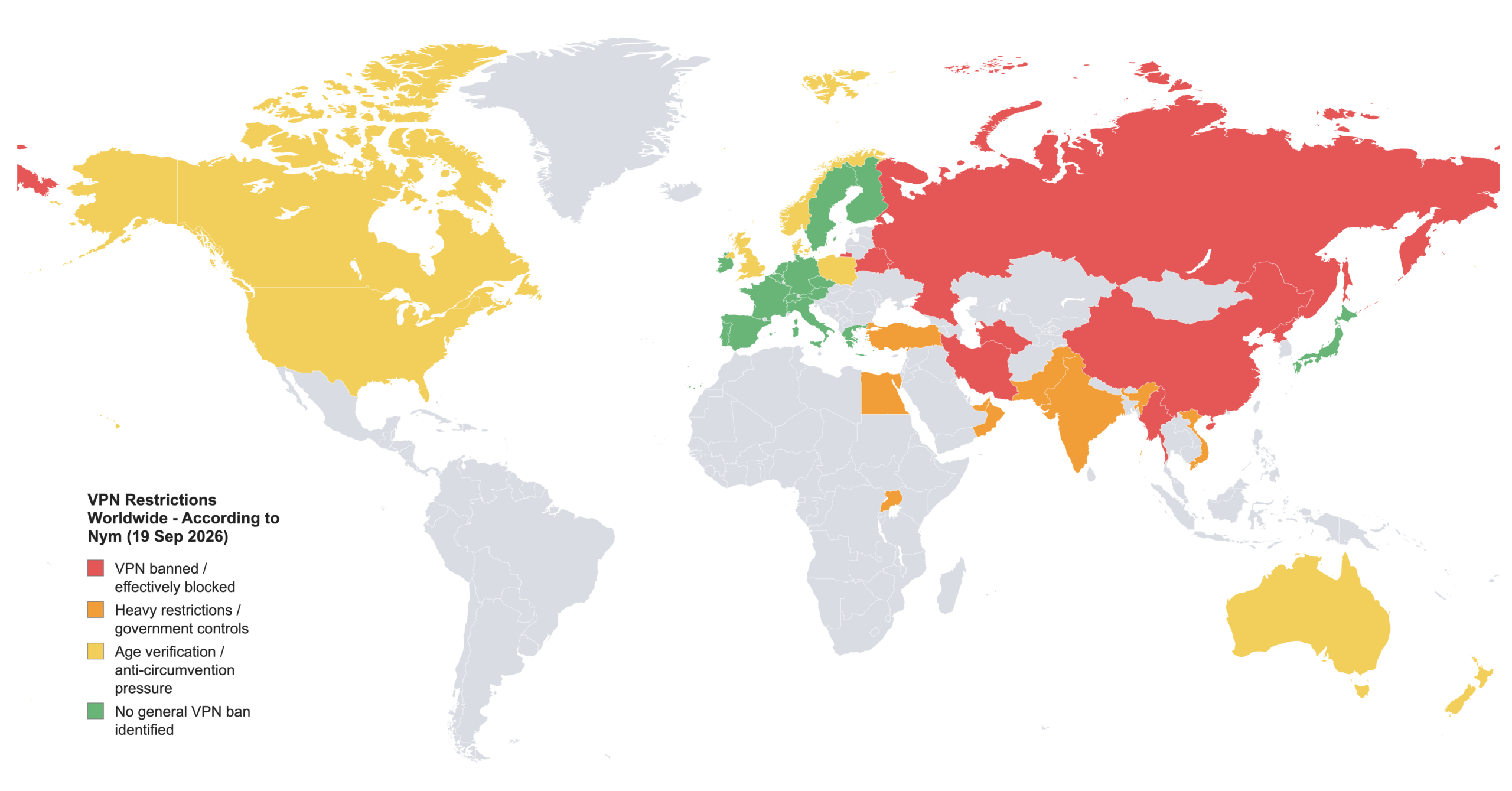
A Virtual Private Network encrypts your internet traffic, making it unreadable to eavesdroppers on public Wi‑Fi and masking your IP address from trackers. Look for:
Actionable tip: Install a reputable VPN (e.g., NordVPN, ExpressVPN, ProtonVPN) on all devices, and turn it on automatically when you connect to any public hotspot.
b. Keep Your Firewall Active
Actionable tip: Verify that both your device and router firewalls are enabled. For extra protection, configure the router to block inbound connections and disable remote administration unless you absolutely need it.
c. Secure Your Home Wi‑Fi
Actionable tip: Update your router’s firmware monthly. Most modern routers support automatic updates—enable this feature to patch known vulnerabilities promptly.
—
3️⃣ Spot & Stop Phishing, Malware, and Ransomware
a. Recognize Phishing Red Flags
| Red Flag | What It Looks Like |
|———-|——————–|
| Misspelled domain (e.g., `paypa1.com`) | Slight typo in a familiar brand’s URL |
| Urgent language (“Your account will be closed”) | Pressure to act quickly |
| Unexpected attachments | Often PDFs, Word docs with macros |
| Generic greetings (“Dear Customer”) | No personal name or details |
Actionable tip: Hover over every link before clicking. If the URL doesn’t match the claimed source, don’t click. When in doubt, type the website address directly into the browser instead of following the email link.
b. Keep Software & Devices Updated
Cybercriminals exploit outdated software. This includes:
Actionable tip: Enable automatic updates wherever possible. For critical business systems, schedule a monthly “patch day” to test and deploy updates in a controlled environment.
c. Deploy Anti‑Malware & Real‑Time Scanning
Actionable tip: Add a secondary on‑demand scanner (e.g., Malwarebytes Free) for a fresh perspective after a suspected infection. This layered approach catches what one engine might miss.
d. Backup, Backup, Backup
Ransomware encrypts your files and demands payment. The most reliable defense is a clean, offline backup.
Actionable tip: Set up automated daily backups to a cloud service (e.g., Backblaze, Google Drive) and a weekly manual backup to an encrypted external SSD stored in a fire‑proof safe.
—
4️⃣ Protect Your Personal Data & Privacy
a. Limit Data Sharing
Actionable tip: Install extensions like uBlock Origin, Privacy Badger, and HTTPS Everywhere to enforce secure connections and block invasive scripts.
b. Encrypt Sensitive Files
Actionable tip: Enable device encryption during the initial OS setup. For existing devices, follow the built‑in encryption wizard—most modern OSes complete the process in the background without performance loss.
c. Manage Social Media Footprint
Actionable tip: Conduct a quarterly “privacy audit” of each social platform—review who can see your posts, remove old photos that reveal personal details, and delete unused accounts.
—
5️⃣ Secure Business Operations (If You Run a Small Business)
a. Adopt a Cybersecurity Framework
Even a one‑person operation benefits from a structured approach:
1. Identify assets (customer data, financial records).
2. Protect with passwords, 2FA, encryption.
3. Detect anomalies using alerts from your security suite.
4. Respond with a documented incident‑response plan.
5. Recover through backups and communication protocols.
Actionable tip: Use free templates from the National Institute of Standards and Technology (NIST) Cybersecurity Framework to draft a simple, scalable policy.
b. Train Employees (or Yourself) Regularly
Human error remains the top cause of data breaches. Conduct monthly “security awareness” drills:
Actionable tip: Subscribe to a free phishing simulation service like “PhishMe” for small teams, or use built‑in features from email providers (Google Workspace, Microsoft 365).
c. Secure Cloud Services
Actionable tip: Conduct a quarterly review of shared files and remove access for former employees or contractors.
—
🔚 Conclusion – Key Takeaways for a Safer Online Experience
1. Strong, unique passwords + 2FA are your first line of defense.
2. Encrypt your connection with a reputable VPN and keep firewalls active.
3. Stay vigilant against phishing and malware—verify links, update software, and run regular scans.
4. Back up your data using the 3‑2‑1 rule to neutralize ransomware threats.
5. Guard personal information through privacy settings, encryption, and limited data sharing.
6. If you run a business, adopt a simple cybersecurity framework, train regularly, and secure cloud services.
Internet security is a continuous journey, not a one‑time checklist. By integrating these habits into your daily routine, you’ll transform your digital life from a potential target into a well‑defended stronghold. Remember: the best offense in cybersecurity is a proactive, layered defense. Stay aware, stay updated, and surf safely!
—
Ready to boost your online safety? Start by picking one action from each section today and watch your digital confidence grow.